Running Matomo in a Privacy-Compliant Way: How to Do It Without a Cookie Banner

Cookie banners are annoying? With Matomo you can finally run analytics in a privacy-compliant, banner-free way. Step-by-step guide plus audit evidence.

Running Matomo in a Privacy-Compliant Way: How to Do It Without a Cookie Banner
J
|Read time: 22 minutes

Let's be honest: cookie banners are annoying. Both your website visitors and you as the responsible person (whether you are a Data Protection Officer, Information Security Officer, or developer) find the constantly popping-up consent prompts disruptive. They impair the user experience and cost you conversion rate. At the same time, web analytics data is valuable. You do not want to forgo understanding how your website is used, and of course you want to comply with data protection and legal requirements. The good news: there is a way to implement analytics in a privacy-friendly manner, often even without a cookie banner. In this article, I will show you step by step how to configure Matomo, the open-source web analytics platform and well-known Google Analytics alternative, so that it works without a consent banner, and what you specifically need to consider in Germany.

We are addressing you directly here, because this topic affects you personally in your role: as a DPO or ISO, you want to establish legally compliant tracking solutions. As a developer, you want to understand the technical measures for implementing Privacy by Design. At the end, you will also learn how to document and evidence the secure use of Matomo with Kopexa, so you are always prepared for auditors.

Cookie banners are a product of the legal landscape in the EU. The background is data protection law (GDPR) and special regulations such as the ePrivacy Directive, which was transposed into German law through the TTDSG (Section 25). While the GDPR governs the handling of personal data, the TTDSG protects privacy on the end device, regardless of whether the information read or stored is personal data. In plain terms: even the storage or reading of information on a user's device (e.g. through cookies or fingerprinting) requires consent, unless it is "technically necessary" for the service. Tracking and analytics services such as Google Analytics or Matomo are not considered technically necessary, and therefore their use fundamentally requires prior informed consent from the user (opt-in), e.g. via a cookie banner. Since the CJEU Planet49 ruling (2019) at the latest, it has been clear that non-essential cookies may only be set with consent, giving birth to the now ubiquitous cookie consent banners.

Exceptions confirm the rule: In some EU countries, there are exemptions from the consent requirement for anonymised audience measurement. For example, the French data protection authority CNIL has defined certain conditions under which web analytics cookies may be set without consent. If a tool meets all the requirements, including IP anonymisation, no personalisation, no data sharing, short retention period and opt-out option, it may be used without a banner. Indeed, the CNIL has confirmed that Matomo can be configured to fall under this exemption. Similar "consent exemption" guidelines for purely statistical, anonymous first-party analytics also exist in Italy, Spain, the Netherlands and other countries.

Germany, however, sets the bar high. The German supervisory authorities (Datenschutzkonferenz) have clarified in a guidance document that only completely anonymous, purely internal audience measurements are permissible without consent. Specifically, this means: only anonymous statistics without profiling may be created, no user may be tracked across multiple websites, and no data may be shared with third parties. Matomo fundamentally meets these requirements best when configured in a privacy-friendly way, more on that shortly. However, the German authorities warn that even using the standard Matomo tracker as JavaScript constitutes access to the end device (for instance, reading screen resolution or device data), thus falling under Section 25 TTDSG. The Federal Data Protection Commissioner (BfDI) prohibited a federal agency from using Matomo without a banner in a 2023 audit report, because the tracking script read the screen size without consent, a violation of Section 25 TTDSG. The agency was ordered to either implement a legally compliant solution immediately or shut down Matomo.

Bottom line: In Germany, consent puts you on the safe side. If you want to track without a banner, you must configure Matomo so restrictively that no storage or reading operations requiring consent take place on the end device, or switch to a different technique.

Matomo as a Privacy-Friendly Alternative

Matomo (formerly Piwik) has made a name for itself as a privacy-friendly web analytics platform. Unlike Google Analytics, you (or your service provider) host Matomo yourself, giving you 100% data ownership. All data stays with you and can be stored on servers in the EU (e.g. on-premise hosting in Germany), minimising international data transfers and cloud risks. Matomo is open source, its code has been reviewed by the community and optimised for security and privacy. The software was developed with Privacy by Design in mind and can be configured to comply with even the strictest data protection laws (GDPR, HIPAA, CCPA, LGPD, PECR, etc.).

An important difference from Google: Matomo can, when correctly configured, be operated without user consent. Google Analytics, by contrast, always requires an opt-in in Europe, since Google also uses the collected data for its own purposes (profiling, advertising). Numerous data protection authorities have therefore deemed Google Analytics not GDPR-compliant (Austria's DSB, the French CNIL and others declared GA use unlawful in 2022). The consequence: many organisations, including public bodies and companies in the EU, are looking for alternatives. Matomo is often recommended because it does not transfer data to third parties, contains no hidden advertising network trackers, and can be fully anonymised. Matomo itself advertises that you can run "GDPR-compliant web analytics" and get rid of the annoying cookie banners. Even the European Commission uses Matomo on its website (instead of GA), a strong signal in favour of data protection.

For you, this means: with Matomo you can conduct web analytics under your own control while respecting user privacy. In the next section, we will look at exactly how you need to configure Matomo to actually operate without a consent banner, because out of the box, Matomo also sets cookies and collects data that could be considered personal.

Before we get into the practical side, let us briefly sort out the legal situation so you can assess whether and when you truly do not need a banner. The general EU-wide rule is: if your tracking stores or reads anything at all on the user's device, you need consent, unless it is strictly necessary for the service. In practice this means: if you use cookies or similar identifiers for tracking, you cannot avoid an opt-in solution. However, if you store nothing on the end device (keyword: cookieless tracking) and also ensure you process no personal data of users, you can legally track without prior opt-in in some countries. Important: transparency and opt-out remain mandatory, meaning you still need a privacy policy with full information and a way for visitors to object to the analysis.

In countries like France, Italy, Spain and the Netherlands: the authorities explicitly allow tracking without consent, provided strict conditions are met. For example, the CNIL has a programme where tools like Matomo are exempt from the consent requirement when all conditions are met. These conditions include: IP addresses are anonymised, no uniquely identifiable IDs are stored (neither in cookies nor elsewhere), no data is used for other purposes (advertising, profiling), only aggregate reports are produced, and users are informed and can opt out. In France, Matomo may even be operated with a short analytics cookie under these conditions, as long as its lifetime is limited to 13 months and the data is deleted after 25 months at the latest. In short: in many EU countries, you can skip the annoying banner with an anonymised Matomo setup plus a notice in your privacy policy.

In Germany, the situation is stricter and unfortunately somewhat inconsistently interpreted. The conservative position (BfDI and some state data protection authorities) says: without consent, only purely server-side analysis is possible, e.g. through log files, since Section 25 TTDSG (no end-device access) does not apply in that case. As soon as you use JavaScript on the page that collects data via the browser, even without setting cookies, they see end-device access and insist on consent. Strictly speaking, in Germany you would also need to show a banner for "cookieless" Matomo tracking as long as the tracker runs in the browser.

However, there is also the view of the DSK (the umbrella body of state data protection authorities) that anonymised, locally operated audience measurement can be permissible, provided truly no personal profiles are created and nothing goes to third parties. The DSK does not explicitly mention Matomo but essentially describes exactly our setup: only anonymous statistics, only first-party and ideally via server log analysis. In practice, many German websites now do it this way: they use Matomo without cookies, with IP anonymisation etc., display no banner, but provide information in their privacy policy. This is a kind of grey area. Risk-conscious organisations seek a legal assessment on this. If an authority reviews it, there may be discussions about whether there truly is no TTDSG-relevant access.

Our tip: If you want to be 100% safe in Germany, forgo client-side tracking and use Matomo as a log file analyser instead. Matomo offers a log analytics function that evaluates web server logs (with anonymised IPs). Nothing is executed in the user's browser, which means Section 25 TTDSG does not apply. You will not get quite as extensive data (no screen resolution, no click events, etc.), but basic statistics on page views, referrers and so on are still available, and entirely without any banner requirement in Germany. If you do use the normal Matomo JS tracker, you should choose the strictest privacy settings (see below) and at a minimum offer an opt-out. Note: the legal landscape continues to evolve, so keep up to date with current authority opinions and rulings. When in doubt, consult your data protection legal adviser, which is also what Matomo itself recommends.

Let us get to the practical part: how do I configure Matomo so that it is privacy-compliant and (ideally) requires no cookie banner? Matomo comes with numerous privacy settings out of the box; you just need to activate them. Here is a step-by-step guide on what you should do:

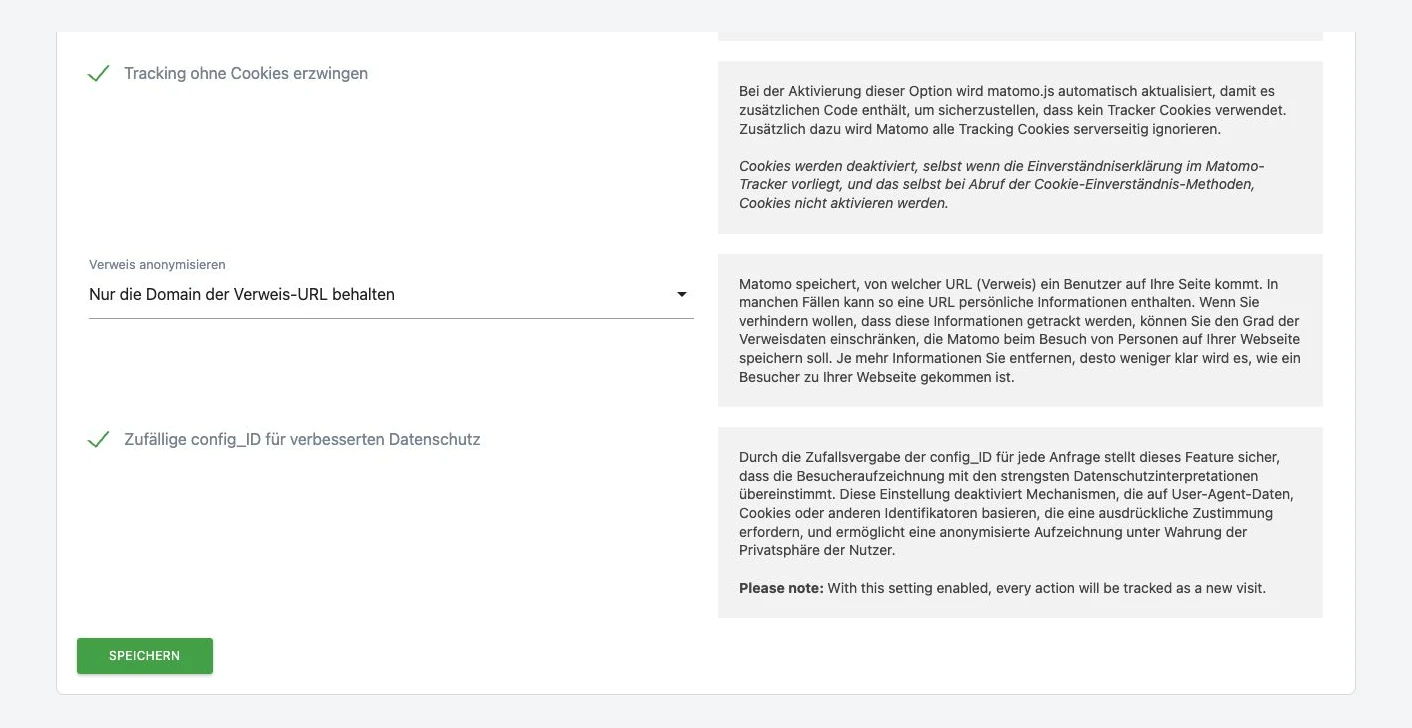
  1. Disable Matomo cookies: By default, Matomo uses first-party cookies to recognise returning visitors and store certain information (visitor ID, session). These cookies are not "essential" and would require consent. You should therefore switch them off. Fortunately, this is very easy: add the disableCookies command to the tracking code before calling trackPageView. If you use Matomo via Tag Manager or WordPress, there are corresponding checkboxes for "Disable cookies". After this, Matomo no longer sets any analytics cookies, meaning no personal data is stored in cookies. Note: Matomo may still create necessary cookies for its own functionality, e.g. a session nonce for the opt-out form or a test cookie that is immediately deleted. These are considered technically necessary and are permissible. What matters is: your visitors no longer receive tracking cookies that could identify them.
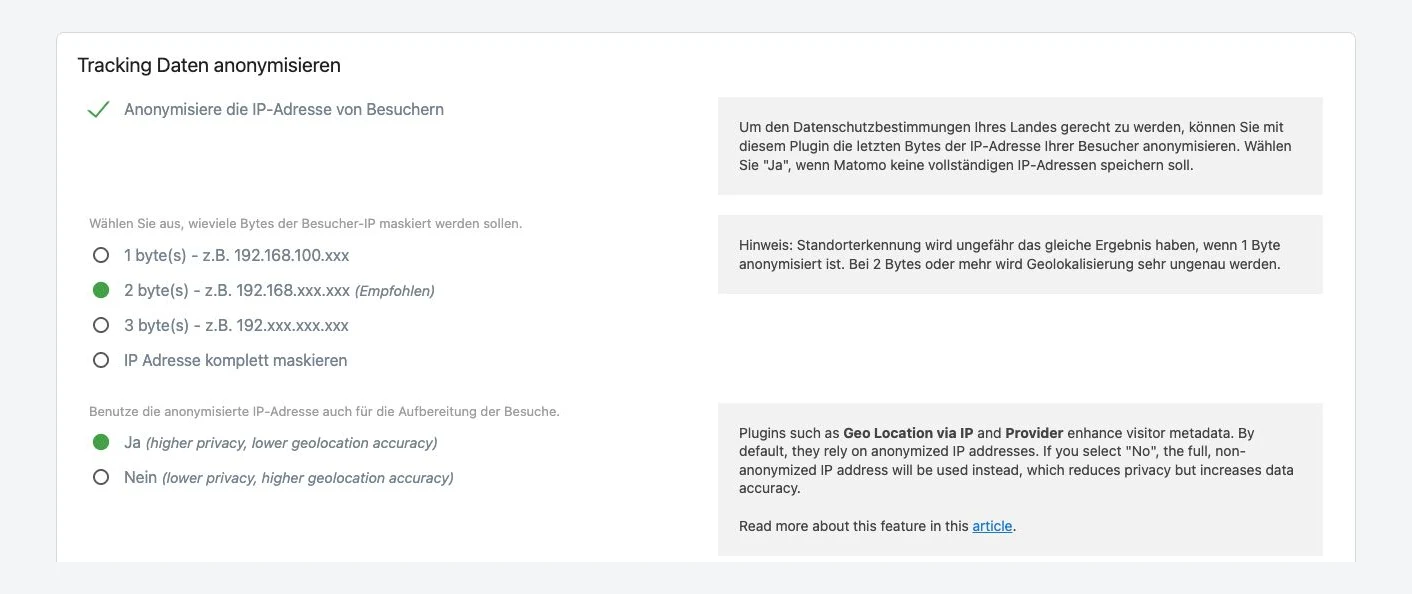
  2. Anonymise IP addresses: The user's IP address is considered personal data in the EU, as it can (theoretically) allow conclusions about the person. Matomo offers a built-in IP anonymisation function. Activate it in the Matomo privacy settings and set it to mask at least 2 bytes of the IP (preferably 3 bytes, or even the entire IP). Specifically, e.g. 192.168.100.123 would become 192.168.xxx.xxx. This means the stored IP can no longer be uniquely attributed. Important: this setting is mandatory if you want to track in a privacy-compliant way in Europe. Without IP anonymisation, you could not claim a "legitimate interest" in tracking, as you would have full personal data. With anonymisation, the risk is greatly reduced.
  3. Anonymise referrer and URL parameters: Often, when navigating from one page to another, personal data is transmitted in the referrer URL or tracking parameters, e.g. a username, customer number or similar (think of Facebook click IDs, session tokens in URLs, or personal page names). Matomo has the option to strip referrer URLs of parameters or not store them in plain text at all. Activate "Anonymise Referrer" to ensure that e.g. facebook.com/profile.php?user=johndoe does not appear in Matomo as such (since johndoe would be identifying). You should also check which URL parameters your site uses (e.g. utm_campaign, etc.) and whether any could be considered personal data. If so, filter them out. Tip: in Matomo 4+, you can globally exclude certain parameters. Also: generally avoid displaying personal names or email addresses in page URLs or titles that Matomo tracks, otherwise you would need to filter these out too.
  4. Do not store personal data in custom dimensions/events: Matomo allows you to track custom dimensions, custom variables and events (e.g. "Click on button X" or "User submitted form"). Here you need to be careful: never enter real names, email addresses, phone numbers, etc. as event data! Matomo stores whatever you send it. By default, Matomo does not record such personal things, but as soon as you define events yourself, you bear the responsibility. Example: you want to track which user registered and send their UserID or email as an event. That would be a clear no-go without consent. Stick to anonymous events (e.g. only "Event registered" without an identifier). This ensures no data in the Matomo database can be traced back to individual persons.
  5. Disable User ID and cross-device tracking: Matomo offers a feature to track logged-in users with a consistent User ID (for cross-device tracking or to link online/offline). This User ID function must remain off if you operate without consent. A User ID is by definition personal data (even if it is just a customer number, it identifies a person). So: do not activate it. The same applies to features like ecommerce tracking, where order IDs are captured. These could lead to persons via order history and are therefore also considered personal data. In summary: do not use any feature that makes individual persons identifiable, as long as you have not obtained opt-in consent.
  6. Restrict "visitor contexts" (disable visit log, profiles): In Matomo, you can view individual visitor sessions in detail (Visit Log) or even create visitor profiles showing all actions of a person over time. For consent-free, anonymous tracking, you should disable these live profiling features. In the Matomo settings, you can deactivate the "Visit Log" and "Visitor Profiles". Then such data is not displayed in the UI at all, signalling: you only want aggregated statistics, not individual behavioural tracking. This also fulfils one of the CNIL conditions (only anonymous, aggregated analysis).
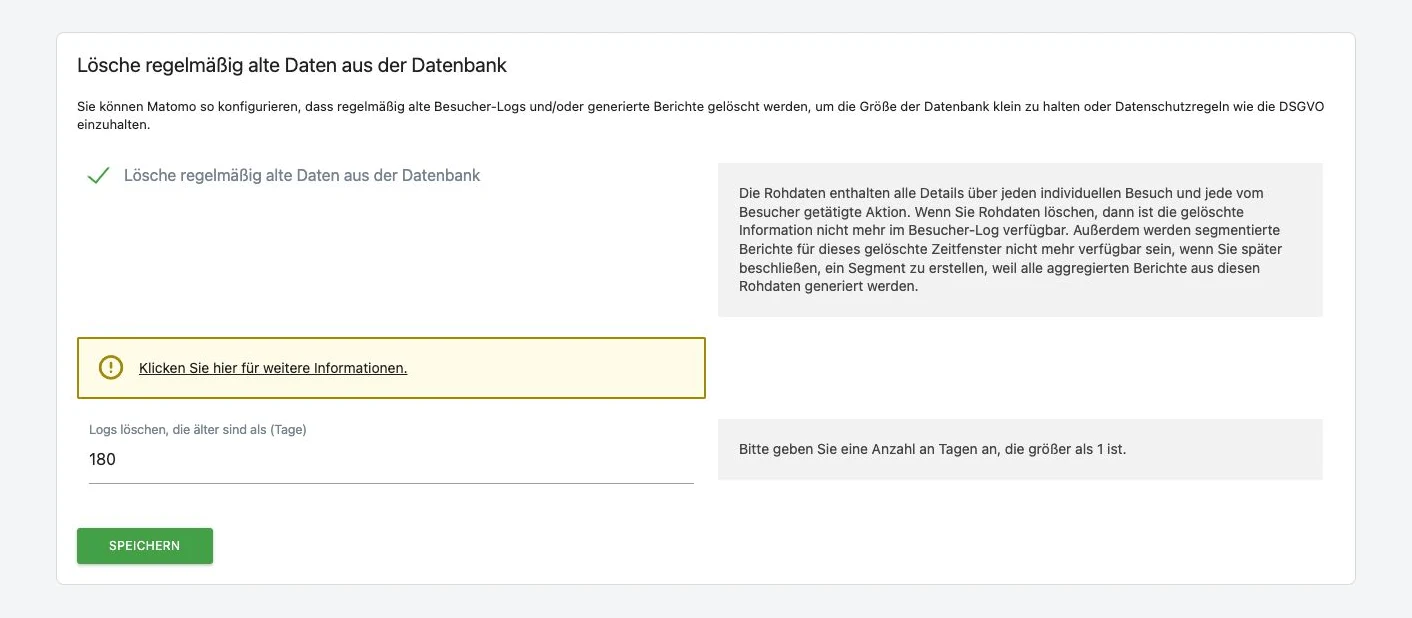
  7. Limit data retention: Do not store analytics data longer than necessary. A short retention period minimises the risk of establishing personal connections through historical data. The CNIL requires a maximum of 25 months' storage for analytics data. In Matomo, you can set old raw data to be automatically deleted after, say, 6, 12 or 24 months. This demonstrates that you take data minimisation seriously, and the statistics remain sufficiently meaningful in the long term (aggregated reports can be retained despite raw data deletion, if configured). German authorities also advise regular deletion of historical tracking data. So ideally set up an automated process: "Delete visitor logs after X days".
  8. No further processing for other purposes: Ensure (and document it) that the collected analytics data is used solely for audience measurement and not suddenly for marketing, profiling or even sharing with advertising partners. The moment you feed the data into a data warehouse and merge it with CRM data, you would be back in personalised territory, and would need consent. So: only first-party analytics, no "data sharing". This should go without saying but is mentioned for completeness.
  9. First-party only, no third parties: Avoid merging Matomo data with other websites or tracking users across different domains. If you have multiple independent websites, run a separate Matomo instance for each or track them separately. Cross-site tracking (even within your company across different offerings) would mean creating more comprehensive profiles, which falls outside the consent exemption. So: a user is only tracked on one website, not across multiple sites.
  10. Offer an opt-out option: Even if you do not obtain prior consent, you must give visitors an easy way to object to data collection. Matomo provides a practical opt-out widget for this. Embed it in your privacy policy or a dedicated opt-out page. This allows users to set an opt-out cookie with a single click, which instructs Matomo not to count their visits going forward. The opt-out cookie is, by the way, essential (because it serves to protect the user) and may therefore be set. What matters is: clearly point out this objection option in your privacy policy. This fulfils the transparency and objection obligations of the GDPR and many country-level regulations.
  11. Transparency: update your privacy policy: Last but not least, you must disclose Matomo in your privacy policy. State what data you collect (e.g. truncated IP, device data, timestamp, page views), for what purpose (audience measurement for website optimisation), on what legal basis you do this (often legitimate interest under Art. 6(1)(f) GDPR is cited, arguing anonymous, user-friendly analysis;

in France it would be the exemption under ePrivacy Art. 5(3), etc.), and that no disclosure to third parties takes place. Also explain that you set no cookies/trackers requiring consent, and describe the opt-out option. This information belongs in your privacy policy for full transparency, even if there is no banner. Just because the user does not have to click does not mean they can be kept in the dark.

When you implement all these measures, you are essentially running Matomo at a "Privacy by Default" level. You only collect anonymised data, produce statistical analyses and avoid any unnecessary identification. This enormously reduces the data protection risk. Matomo itself calls this mode of operation the "Consent-free Tracking Mode", in which no personal data is processed and which therefore requires no prior consent in many countries.

Benefits: Better User Experience and Less Data Loss

Why all this effort? Is it worth it? Yes! When you run Matomo this way, you benefit from several tangible advantages:

  • No more annoying banners: Your visitors are not immediately confronted with "We use cookies, do you agree?" upon arrival. This improves the user experience enormously, especially for mobile users. Nobody enjoys clicking "Accept all" away before seeing content. Without a banner, users can browse more accessibly and with less friction. And let's be honest: it also shows respect for your visitors when you protect their privacy from the outset rather than forcing them to choose between being tracked or leaving the site.
  • Less drop-off, more data: Studies and real-world experience show that cookie banners cause a significant proportion of users to reject tracking or leave the site immediately. With a consent-free Matomo setup, this "opt-out before the first click" disappears. You do not lose 30-50% of your analytics data through rejection, but can count nearly all visits. Even if your stats do not uniquely identify every visitor, you end up with a fuller picture of traffic than with an opt-in tool where sometimes more than half of users are not tracked at all. Your marketing and content decisions can therefore be based on a broader data foundation.
  • Compliance by Design: By proactively limiting the amount of data and anonymising everything, you drastically reduce legal risk. You demonstrate to supervisory authorities and users that you take data protection seriously and have implemented it technically (not just on paper). Should someone ask questions (audits, enquiries), you can explain in good conscience: "We do not collect personal tracking data, we forgo cookies, and we meet all requirements." This relaxes the situation, especially at a time when Google Analytics is under fire. You offer a trustworthy alternative.
  • No third-country data transfers: With your own Matomo hosting (e.g. on a German server), you sidestep the whole Schrems II and Privacy Shield issue. Your website visitors' data stays in the EU. You do not need to conclude Standard Contractual Clauses with a US provider, no headaches about American authorities' access. Particularly for public bodies, authorities or sensitive industries, this is a must-have. And even for ordinary companies, it is a plus when your privacy policy can state: "We use Matomo self-hosted; data is not shared with third parties." This builds trust.
  • More performance and less "cookie fatigue": A side effect: without a cookie banner, you have a faster load time (no consent manager script, less overhead) and your users do not have that latent distrust ("Another tracking banner"). The sentiment towards your web presence subtly improves, which can pay off in longer dwell time or more interactions. Some practitioners even argue that the absence of a banner improves brand perception, because you are not associated with the negatively connoted cookie pop-ups.

Of course, it is not all sunshine. You need to be aware of the limitations. As mentioned, you receive somewhat less granular data (unique visitors etc. are imprecise). Some advanced features of Matomo (heatmaps, session recordings) cannot be lawfully used without consent, as they involve personal data (e.g. detailed mouse movements, potentially text input), which is why we have left them out. If you need such features, you would have to obtain consent before activating them. This article assumes the use case of "normal web statistics", for which the described setup is ideal.

Kopexa: How to Secure Matomo and Provide Evidence

Now that you know how to run Matomo in a technically privacy-compliant way, the next question arises: how do you verify and document this? Especially as a DPO or ISO, you do not want to simply trust that everything is in order. You want to prove it. This is where Kopexa comes in. Kopexa is a compliance platform that integrates IT security and data protection frameworks (such as ISO 27001, TISAX, GDPR, NIS2, etc.) in a single solution. With Kopexa, you can manage assets, risks, controls and evidence in one place, ideal for securing and proving your use of Matomo, for example.

Imagine you have registered your website analytics system (Matomo) as an asset in Kopexa. You can now assign the relevant data protection and security controls, such as requirements from the GDPR (e.g. Art. 25 "Data protection by design" or Art. 32 "Security of processing") or from a security framework. Kopexa provides many standards out of the box, including a GDPR control catalogue. You can now record for your Matomo asset how the individual controls are technically implemented. This is where the concept of "component definition" comes in: Kopexa uses concepts from OSCAL (Open Security Controls Assessment Language), an open standard from NIST, to document precisely such implementation details cleanly. In a component definition, you describe, for example, which security or data protection measures a software component fulfils. For Matomo, this could mean: Control X (e.g. "No tracking cookies are set") - Implementation: In Matomo, *disableCookies* is activated, configuration as of [date]. Or Control Y ("IP addresses are anonymised") - Implementation: Matomo masks the IP by 2 bytes, setting activated on [date]. Such a component definition serves as evidence documentation of how Matomo meets the requirements.

The highlight: Kopexa collects and versions evidence automatically for you. You can, for example, attach screenshots of your Matomo settings, excerpts from the config file, or reports, and Kopexa stores them in an audit-proof manner. Every configuration change can be documented as a new version. You could also automate regular checks: Kopexa can be integrated into CI/CD pipelines, so that, for example, a script monthly checks whether Matomo sets any cookies (via browser scan). The result (report: "No cookies found") could be uploaded directly as evidence. Sounds futuristic? Perhaps, but Kopexa is designed to leverage integrations and verify evidence. This means you are always audit-ready: if an auditor comes or your management asks, you can pull a report with a few clicks: Matomo Analytics - all technical and organisational measures - evidence included. This saves you manual Excel lists and nervous scrambling just before an audit.

In short: Kopexa helps you systematically secure your privacy-friendly Matomo deployment. You maintain an overview of which requirements are met and can prove it to third parties. That is "compliance without the nonsense", as we say at Kopexa - less paperwork, more actual security. Especially in combination with a tool like Matomo that enables Privacy by Design, Kopexa shows its strength: the technical and documentary safeguarding go hand in hand.

Conclusion

Running a tracking tool without a cookie banner in a privacy-compliant way is possible, and in times of strict data protection laws it is a genuine competitive advantage. With Matomo, you have a proven solution at hand that, when correctly configured, fully focuses on privacy. You respect your users' rights, avoid legal risks, and still enjoy valuable insights into behaviour on your website. The technical measures, from cookie deactivation through IP masking to opt-out, are not rocket science, but they do require some care and know-how. This effort is worth it: your users experience a better UX, you lose less data through opt-outs, and you act in the spirit of Privacy by Design, which builds trust in the long run.

With a tool like Kopexa at your side, you can also ensure that no important step is forgotten and that you can always provide evidence of your data protection measures. This brings peace of mind internally (within the team, to management) and externally (to auditors or supervisory authorities).

In the end, everyone wins: your visitors, because their privacy is protected. You and your team, because you get the analytics data you need without constantly "worrying about consent". And not least your company or organisation, which operates GDPR-compliantly without sacrificing innovation and insight.

Do you have questions or your own experiences with Matomo and data protection? We would love to hear from you, and if you need support with implementation, we (and Kopexa) are here to help. On that note: good luck with privacy-compliant tracking. It feels so much better when web analytics is possible without a guilty conscience!

Sources:

The sources include official documentation (Matomo FAQ/guides), legal sources and blog posts by experts, among others: Matomo documentation on consent-free usage, the DSK guidance on the TTDSG, the BfDI audit report on BMFSFJ 2023, as well as Matomo privacy features and CNIL guidelines. These references substantiate the recommended measures and legal interpretations.

Frequently Asked Questions

Can Matomo really be used without a cookie banner?
Yes, if you configure Matomo so that no tracking cookies are set, IP addresses are anonymised, and no personal data is processed. In many EU countries such as France this is explicitly allowed. In Germany the rules are stricter, but it is possible with cookieless tracking or log file analysis.
What must be considered in Germany when using Matomo without a banner?
German data protection authorities set a high bar. Even reading device data via JavaScript can fall under the TTDSG. For maximum legal certainty, log file analysis is recommended since nothing runs in the browser. In any case, a privacy policy and an opt-out option are mandatory.
Which technical measures are required for GDPR-compliant Matomo?
The key steps are disabling cookies, anonymising IP addresses (masking at least 2 bytes), sanitising referrer and URL parameters, disabling user ID tracking, deactivating visitor profiles, and limiting data retention periods.
Why is Matomo more privacy-friendly than Google Analytics?
With Matomo you host the data yourself, keeping everything in the EU. Google Analytics transmits data to Google and uses it for its own purposes such as profiling. Several EU data protection authorities have ruled Google Analytics non-GDPR-compliant.
Do you lose analytics data when tracking without a cookie banner?
On the contrary. Cookie banners often cause 30-50% of users to reject tracking. Without a banner, nearly all visits are counted. The data is less granular but the overall data base is broader and more complete.
Do I still need a privacy policy if no banner is displayed?
Yes, absolutely. You must disclose in your privacy policy what data you collect, for what purpose, on what legal basis, and that no data is shared with third parties. An opt-out option must also be provided.