Windows 10 LTSB 2016: Which legacy devices should you check now?
Windows 10 LTSB 2016 reaches end of support. Assess affected systems, business impact and decisions on migration, ESU or time-limited operation.


Production is running. The scale returns measurements. The test bench records results. But does anyone know which of those systems still receive security updates?
Operating-system end of support is an operational decision, not just an IT calendar entry. A device may continue working after regular security updates end. You need an inventory of affected systems, their business purpose and an accountable plan.
TL;DR: What to check now
- Identify edition and version: “Windows 10” is not enough to determine support status.
- Find the business dependency: Which production line, test or service needs the device?
- Plan with the provider: Assess upgrade, replacement or an eligible transitional option.
- Manage the risk: Record owners, safeguards, decisions and a review date.
Did Windows 10 support not already end?
Regular support for Windows 10 22H2, including Home, Pro, Enterprise and Education, ended on 14 October 2025. Microsoft’s lifecycle announcement confirms this. Additional updates through an ESU programme need to be considered separately.
The current trigger concerns two specific long-term releases. It is not about every Enterprise licence. Check the edition and version actually installed:
| Installed version | Regular support ends | Context |
|---|---|---|
| Windows 10 22H2, e.g. Home or Pro | 14 October 2025 | Already ended; check ESU separately |
| Windows 10 Enterprise 2016 LTSB | 13 October 2026 | This article’s current trigger |
| Windows 10 IoT Enterprise 2016 LTSB | 13 October 2026 | Current trigger, including industrial PCs |
Microsoft identifies 13 October 2026 as the support deadline for Windows 10 Enterprise 2016 LTSB and Windows 10 IoT Enterprise 2016 LTSB. Its paid Extended Security Updates (ESU) programme provides certain security updates beyond regular support for eligible, enrolled devices.
This does not apply indiscriminately to every Windows 10 installation. Other editions, versions and support programmes need individual checks. Windows Server 2016 is also a separate product; its deadline cannot be inferred from a Windows 10 product name.
The industrial relevance is concrete: Beckhoff flags October 2026 for this IoT edition on its industrial PCs and offers an assessment of possible upgrades. This does not mean that every older industrial device uses that edition.
Which devices should you check?
Microsoft describes Windows IoT Enterprise as an operating system for fixed-purpose devices. Examples include industrial automation, point-of-sale terminals, kiosks, ATMs and medical devices.
Older industrial and operator PCs, test or measurement stations, point-of-sale systems and terminals are therefore useful candidates for an inventory check. A device is not affected merely because it belongs to one of those categories. It must actually run the 2016 LTSB release. A ten-year-old chassis may now contain a different operating system.
Check system information against your inventory and vendor documentation: edition, version and build. Microsoft lists LTSB 2016 as version 1607 with 14393 builds in its release information. Version alone does not replace the edition check. Involve the maintenance provider for equipment with vendor-approved configurations.
Still working is not a security assessment
A device does not automatically fail or become compromised because a support date passes. The concern is how newly discovered vulnerabilities will be handled and how long continued operation remains acceptable.
An isolated measurement station needs a different assessment from an internet-connected workstation or a machine maintained remotely by a supplier. Include removable media, maintenance laptops and data transfers. “Not connected to the internet” is not equivalent to “no attack path”.
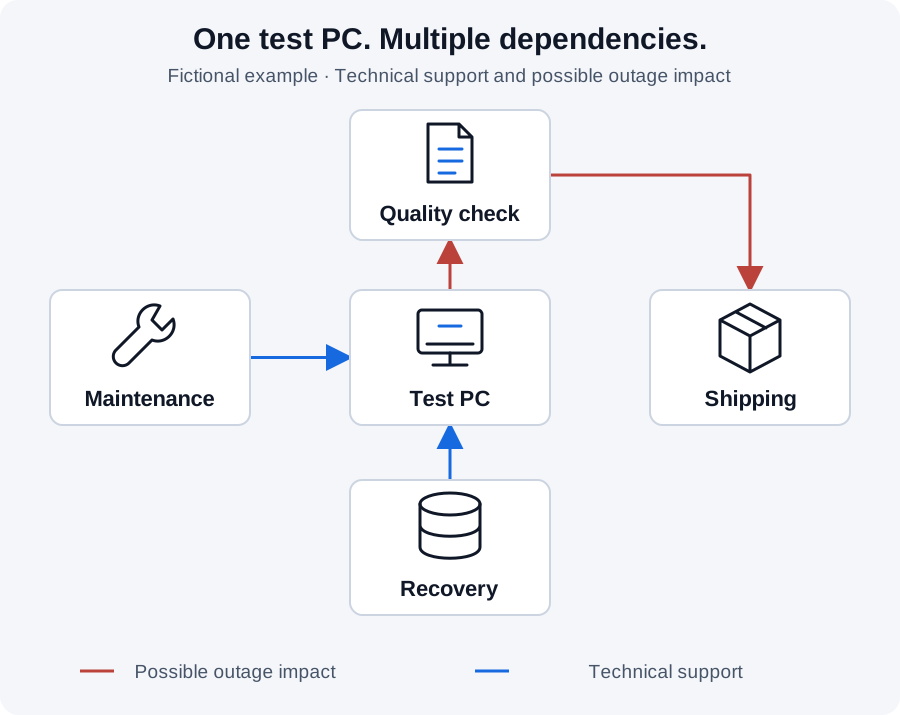
Our guide to prioritising cyber risks covers the broader selection of safeguards. This article addresses a specific lifecycle decision for an identified device.
Six details that turn an inventory into a working plan
The following table is our own working aid. It does not replace vendor confirmation or technical assessment.
| Record | Practical question | Why it helps |
|---|---|---|
| Device and software | Which edition, version and business application actually run? | Prevents incorrect support assumptions |
| Business purpose | Which line, test or service needs the system? | Makes operational impact visible |
| Ownership | Who operates, decides and maintains it? | Prevents unanswered questions |
| Connections | Network, remote support, USB or data exchange? | Identifies relevant attack paths |
| Recovery | Are backups, configurations and recovery tests available? | Establishes whether operations can resume |
| Decision | Which option applies until when, with what evidence? | Turns a finding into accountable work |
Bring IT and business teams together. IT may know the operating system, production may know the cost of downtime, and the supplier may know the upgrade constraints. None of those perspectives is sufficient on its own.
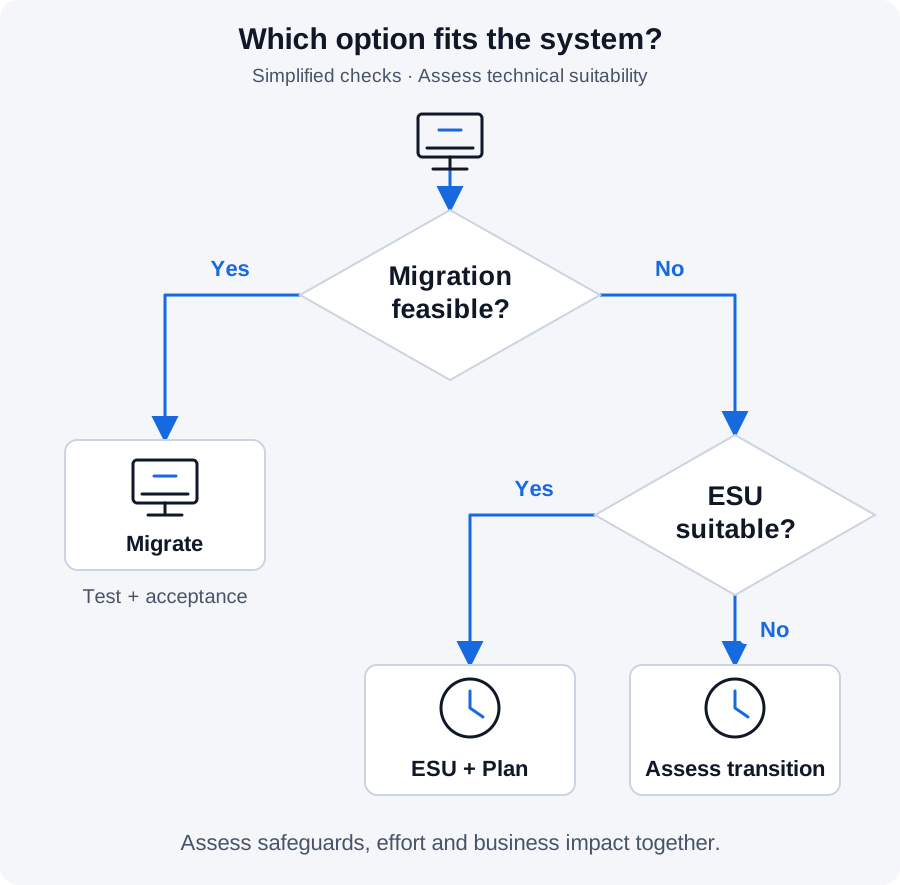
Upgrade, replacement or transition: Which option fits?
A version change may affect drivers, control software or approval of a machine. Check supported combinations, test facilities and a maintenance window with the manufacturer. A spontaneous upgrade on a running installation is not a migration plan.
Migration or replacement: Define the supported target, compatibility checks, testing, rollback and acceptance by the business team. Name the person confirming successful operation.
ESU as a bridge: Check eligibility, cost, prerequisites and successful activation. Microsoft describes a paid programme for critical and important security updates. It does not guarantee compatibility of your business application or replace a long-term migration plan.
Time-limited operation with safeguards: Where immediate migration is not feasible, IT and the business team assess the actual risk. Restricted connections, controlled maintenance access and tested recovery may be relevant. Their suitability depends on the installation; they do not automatically make an unsupported system equivalent to a supported one.
Example: A test bench can only migrate at the next maintenance window
Fictional example: A manufacturer operates an older test PC. The application is approved for a specific environment. The service provider can only test migration during the next planned shutdown.
The team records more than “risk accepted”. It agrees a verifiable transition:
| Decision | Owner | Verify the result |
|---|---|---|
| Confirm target version and approval | Equipment owner with supplier | Written compatibility assessment |
| Restrict remote support to necessary access | IT with maintenance | Reviewed access rule |
| Test recovery | Test-bench operator | Test result and outstanding issues |
| Migrate during the maintenance window | Named project owner | Acceptance and updated inventory |
Management decides on continued operation using this information. At the agreed review date, the team checks whether assumptions still hold and the plan was completed. Recording a decision alone does not remove technical risk.
Connect the work across GRC
Use asset management to record the system and its owner. Processes and business impact analysis establish its operational importance. Supplier management supports coordination with the maintenance provider. Risks and remedial actions belong in the same working chain.
Kopexa helps connect this information with risks, tasks and evidence. Missing vendor responses and overdue migrations become visible. Technical suitability still requires professional assessment.
Your next step: Choose one critical installation. Check edition, support status, ownership and recovery. To connect this work across locations and teams, see the workflow in a Kopexa demo.
Frequently Asked Questions
- Does support end for every Windows 10 device in October 2026?
- No. The current trigger concerns the named LTSB 2016 editions. Check other versions, editions and support programmes separately. Record the actual installation rather than only the product name.
- Is a device immediately unsafe after support ends?
- The date alone establishes neither compromise nor failure. Assess future security updates, attack paths, business impact and a justified transition.
- What should we record first?
- Choose one operationally important system. Record edition, version, support status, process dependency, owners and recovery options. Then assess feasible options with the provider.
- Does documenting continued operation make it safe?
- No. Documentation makes the decision accountable. Safeguards, migration and recovery need assessment and verification. A time-limited decision requires another review date.
Sources
- Microsoft: Extended Security Updates for Windows 10 LTSB 2016 [Accessed ]
- Microsoft: Windows 10 2016 LTSB lifecycle [Accessed ]
- Beckhoff: Support period ends in October 2026 [Accessed ]
- Microsoft: Windows 10 end of support [Accessed ]
- Microsoft: What is Windows IoT Enterprise? [Accessed ]
- Microsoft: Windows 10 release information [Accessed ]