Vendor Assessment Software
Review vendors. Without chasing every response.
Sending a request is quick. Collecting, evaluating and following up on responses takes time. Kopexa automates survey delivery, reminders and response-based risk ratings. Your team focuses on the questions that need a decision.
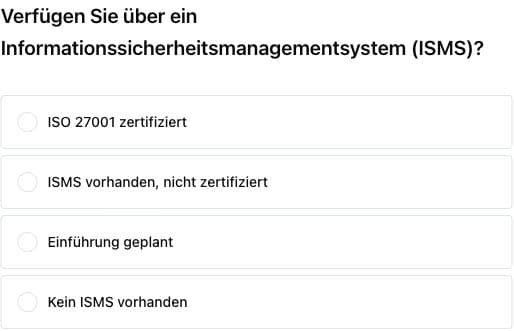

Less chasing
Surveys and reminders go to your vendors automatically.
Your criteria
Configurable rules translate responses into risk ratings.
Clear next steps
Review answers and connect follow-up work to the vendor.
Our customers

















From questionnaire to response
Delivery and reminders run. Your team stays with the result.
Choose the survey and recipient. Kopexa automatically sends the request and reminds the vendor. Status and deadline show where a response is still missing. Answers are evaluated for risk ratings using your configured rules.
- 01
Prepare
Choose a survey and configure your response and risk rules.
- 02
Request
Select the recipient. Kopexa handles delivery and reminders.
- 03
Evaluate
Consider the automated risk rating and review relevant answers.
- 04
Follow through
Resolve questions and link risks, documents or tasks to the vendor.
A shared basis for evaluation
Risk ratings that reflect your criteria.
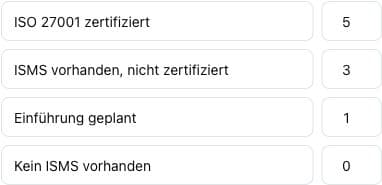
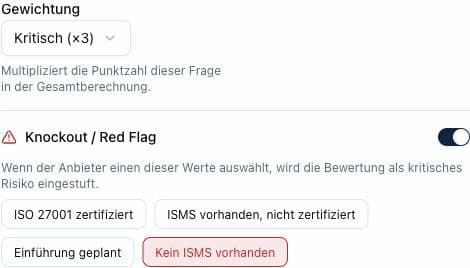
The Survey Engine supports automated, response-based risk ratings. You set response values, weightings and knockout or red-flag rules. Choose a survey that matches the review purpose, rather than rebuilding each request. Your team can evaluate vendors against a shared basis.
Answers that need attention
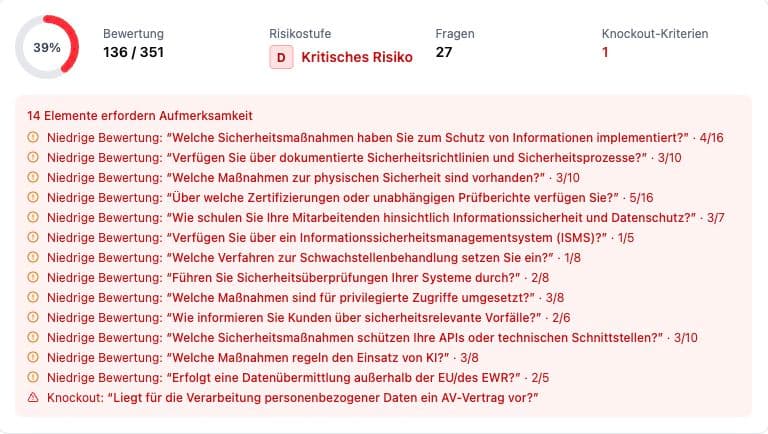
A rating is a starting point. The answers add context.
Open the assessment and examine individual questions. Filters for questions needing attention and commented questions help focus the review. Your team can consider follow-up questions and risk ratings in the vendor's context, without transferring the result into another spreadsheet.
Turn an assessment into ongoing work
The questionnaire ends. Ownership continues.
The assessment belongs with the vendor profile. Supplier relationships, ownership and regular reviews sit alongside linked risks, assets and tasks. The assessment stays connected with the work that follows.
Explore vendor management and TPRM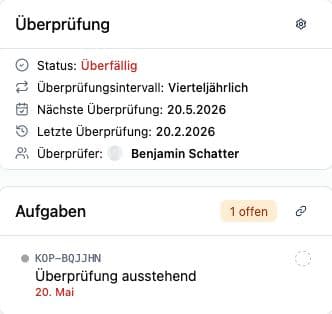
What should a vendor assessment establish?
The right questions depend on the service and your dependency on it. For the security assessment of IT providers, these topics can be a starting point:
- Security measures, access and authentication
- Certifications and available evidence
- Sub-suppliers and further dependencies
- Business continuity and security incident handling
- Data processing, locations and transfers
Questions about automated vendor assessments
What is a vendor assessment?
A vendor assessment is a structured evaluation of a supplier or service provider. A survey collects information for your review purpose. Kopexa automates delivery and reminders, while response-based risk ratings follow your configurable rules.
Does Kopexa automatically send surveys and reminders?
Yes. You select the survey and recipient. Kopexa handles automated delivery and reminders to the vendor. Status and deadline help your team keep track of outstanding responses.
Can we configure the automatic risk rating?
Yes. The Survey Engine supports configurable rules for response-based risk ratings. You determine how answers contribute to the rating. The rating supports evaluation; reviewing relevant responses remains part of your workflow.
What happens after a vendor assessment?
The assessment remains accessible on the vendor. You can link risks, documents and tasks to the vendor and plan the next regular review. Supplier relationships and assets provide context for further decisions.
Is a questionnaire alone Third-Party Risk Management?
A questionnaire provides information about a vendor. TPRM also connects dependencies, risk evaluation, ownership, treatment and ongoing review. Vendor assessments in Kopexa form part of that shared context.
Bring your questionnaire. We will show you the work that follows.
See delivery, reminders, configurable risk ratings and follow-up reviews together in a demo.
See vendor assessments in action