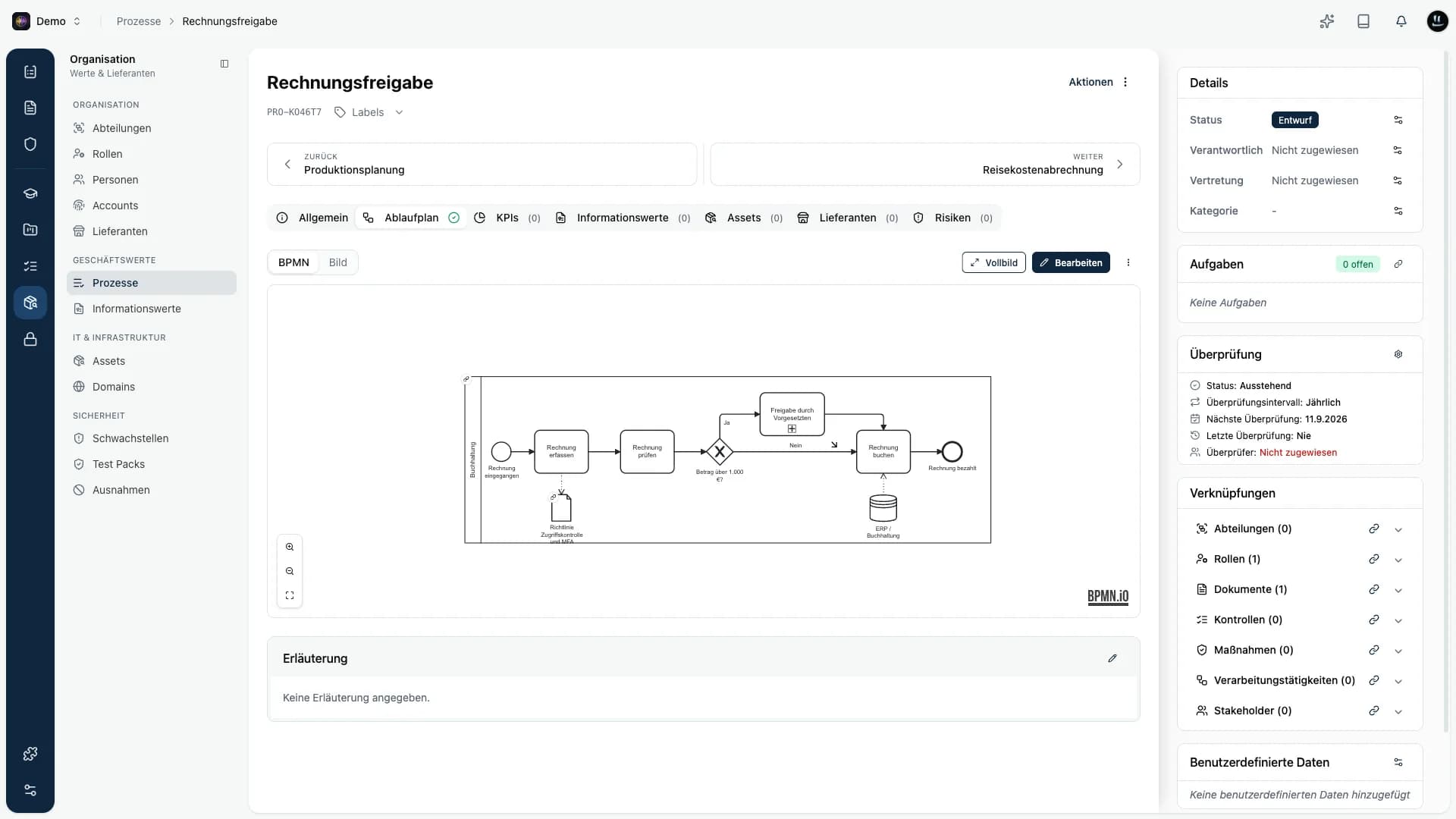
This round bundles several releases. Processes get a BPMN editor for their process maps, ChatGPT and Claude connect directly to Kopexa and work with your data there, and document approval follows your needs. On top comes a long list of improvements across the platform.
TL;DR
- BPMN editor for processes, with import and export.
- AI connection: ChatGPT and Claude read and edit your Kopexa data, in the Enterprise plan.
- Documents: approval set per category and per document, new filters, folders with colors that can be deleted.
- Vendor assessments: deadlines no longer lock vendors out, assessments can be withdrawn.
- Assets and risks: reworked detail views, faster hierarchy maintenance.
- Space export: your entire space as an archive.
Processes: process maps in BPMN
You now draw and edit process maps in a BPMN editor right inside Kopexa: start and end events, tasks, decisions, swimlanes, documents and data stores. Import existing BPMN files and export finished maps again, for example for other tools or your audit.
The real value is in the links: you connect individual diagram elements directly to your Kopexa entries. A data object points to a document, a data store to an asset or information asset, a subprocess to another process and a pool to a role. If an entry is missing, you create it right from the selection. On save these links become the real relations of the process, and clicking a linked element shows you the entry with a link to its detail page. Export keeps the links, and Kopexa restores them on import.
The Flowchart tab shows at a glance whether a process already has a map. Everything else is in the documentation.
AI connection: ChatGPT and Claude work in your space
Until now your compliance data and your AI assistant lived in separate worlds. With the AI connection you connect ChatGPT or Claude directly to Kopexa. The assistant does not just read, it works with you: it creates, updates and links, in almost every area of Kopexa.
A few examples of what you can ask:
- "Create a phishing risk, import matching measures from the catalog and link them."
- "Which controls in the ISO 27001 program are not implemented yet? Create a task for each."
- "Revise our password policy and add a section on passkeys."
- "Set up a program for Cyber Trust Austria."
What is behind it:
- Almost every area: risks, measures, controls, programs, tasks, assets, information assets, vendors, processes, incidents, findings, evidence, KPIs and more. Create and update entries, link them to each other, write comments.
- Catalogs: the assistant searches the Kopexa risk catalog and measure catalog and imports matching entries straight into your space instead of rewording everything. Nova, the assistant inside Kopexa, can do this too.
- Documents: it revises content as a new draft version. Publishing still goes through your approval.
- Programs come with all controls of their framework.
- Large data sets: the assistant pages through long lists completely and filters by relation, for example all controls of a program.
Security stays with you. Sign-in runs through your Kopexa login, the assistant only sees and changes what your account is allowed to, and every session is bound to exactly one space. It cannot delete anything.
The AI connection is part of the Enterprise plan and is activated by us for your organization. How to connect ChatGPT, Claude or Claude Code is described in the documentation.
Documents: approval when needed, a better overview, folders
Not every document needs the same approval process. With the "Review required" setting you decide per document category whether a review is mandatory before publishing or optional. When creating a document, and within the document itself, you can override the category default. Without the requirement you publish directly; as soon as you assign reviewers, the regular flow applies. Details are in the documentation.
In the document overview you now filter by reviewer and by the status of the latest version. The quick filters "My open reviews" and "My open approvals" show you in one click what is waiting for you. The role is now consistently called "reviewer" there.
Folders get a color and can be deleted once they are empty. Just move their documents to another folder first.
A new button in the editor resets formatting, ideal after pasting from Word or other editors. Document templates scroll, and the preview follows your selection.
Vendor assessments: deadlines without the lockout
A deadline is a signal, not a door slamming shut. Vendors can keep filling in an assessment after the deadline. For you the deadline is marked red, and in the responses you filter by "Overdue".
- Withdraw: an assessment that is no longer needed can be withdrawn, optionally with an internal reason. Answers already given are kept.
- Extend the deadline when resending and when requesting changes.
- Clearer e-mails: the invitation states the deadline, reminders and change requests each have their own e-mail.
- Targeted reminders 7 days and 1 day before the deadline, overdue assessments show up in your weekly summary.
- Tidier view: decision on the right, deadline with time left, sections as headings, column selection in the assessment lists and a leaner send dialog.
Invitation links stay valid for the whole deadline, including after a resend, and submitted answers are locked.
Assets, risks and hierarchies
The asset detail view is reworked: tabs sit higher, details like the owner move to the sidebar, and previous and next take you straight to the neighbouring asset. The asset hierarchy is paginated, so many links no longer mean endless scrolling. In the asset list you filter by "Has sub-assets" and "Has parent assets".
Hierarchies for vendors, processes and assets are faster to maintain: link many entries at once and remove links selectively. Linked assets get quick filters for groups and a per-asset menu to remove the link.
The risk detail view also gets previous and next, a General tab and a more compact layout. Documents now live in the sidebar.
Space export
Export an entire space as an archive: all entries, their links and the uploaded files. Useful for your own backups, for auditors or for moving data.
More improvements
Surveys
- Surveys with responses are archived instead of deleted. You find them in the new Archive tab and can delete them there for good, including all data. Surveys without responses you delete directly as before.
- Responses can be exported one by one or via multi-select.
- Knockout questions show up in the survey, the rating stays visible after approval, and unrated surveys show no risk value.
Filters and lists
- Every list view filters by owner, including entries without an owner. In the evidence list this filter returns results reliably.
- Findings filter by "Assigned to" and status, risks by "Updated at".
- The evidence list is paginated.
- So many frameworks that the overview needs pagination: honestly, we did not see that coming ourselves. The framework list now pages too.
Tasks and organization
- On the task board, a long press moves a card and a short click opens the details.
- When creating a task, "Create" for milestones opens a dialog instead of taking you away from the page.
- The org chart handles more than 20 departments and keeps your view when you add new ones.
Programs, controls and audits
- Creating a program takes over every control, even when frameworks use the same control number, and the start date is saved correctly.
- In an audit, controls can be set to "Not applicable".
- Opened from a program, previous and next move between the controls of that program.
- In a control's "Evidence" tab, every piece of evidence opens its details.
Assets
- Assets with inherited protection needs can be set to active, and active assets stay editable.
- An asset's kind is fixed once it is created.
Clear messages instead of generic errors
- Duplicate names, for example for information assets, departments or people's e-mail addresses, are rejected with a clear message, for departments right in the form.
Other
- User selection in comboboxes scrolls smoothly.
- If a document upload fails because of the network connection, the message says exactly that.
- Assessments of deleted vendors end with the vendor, so the vendor detail page loads reliably.
- Spaces can be created with any name.
- API token management is fully translated.