News
WFX attack on GitHub: malicious workflows steal secrets
WFX has targeted GitHub repositories since 10 November. What is known about stolen tokens, malicious workflows and cloud access, and what teams should investigate.
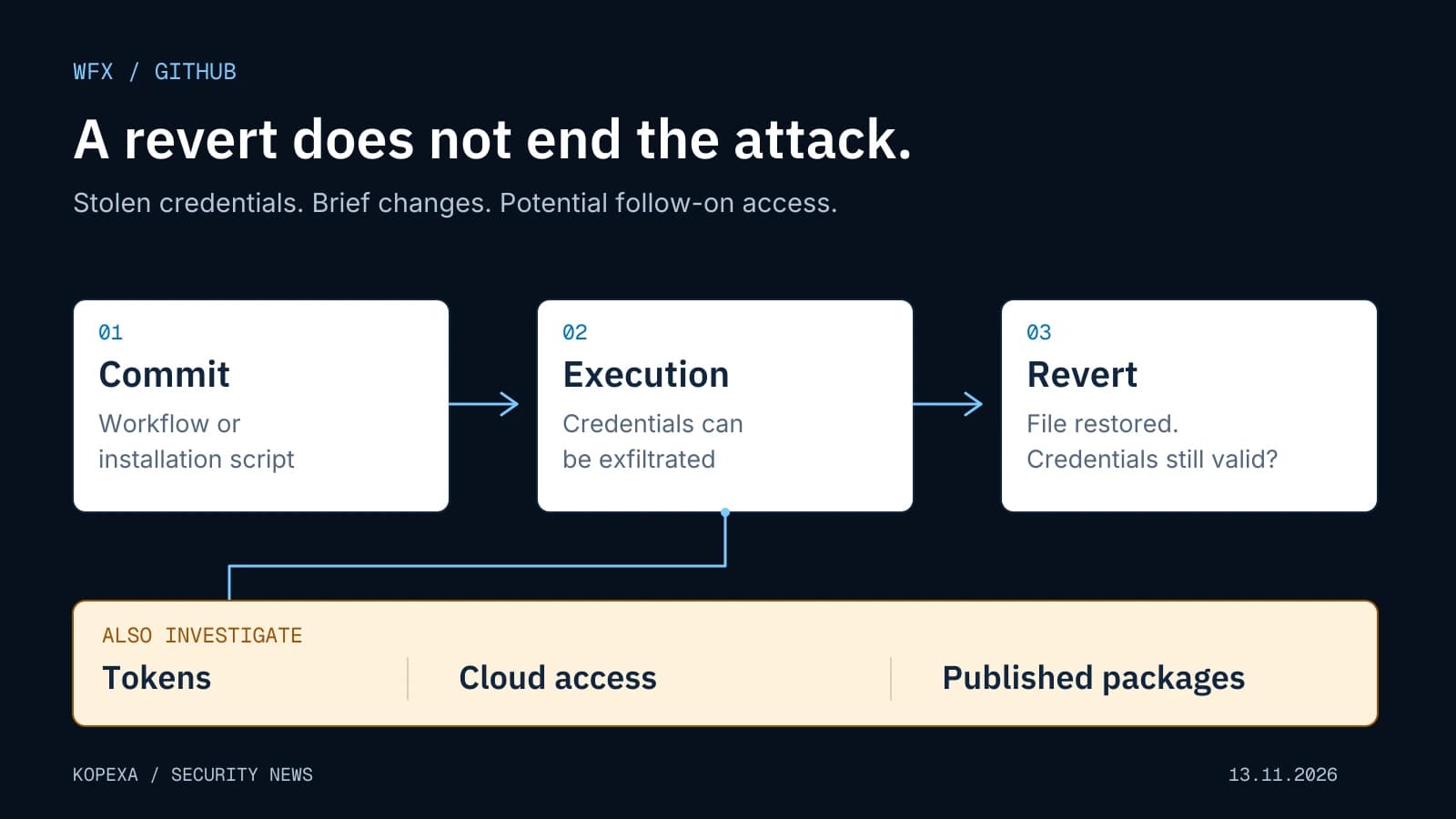

Since 10 November 2026, attackers have used stolen GitHub credentials to inject malicious code into repositories. Researchers track the campaign as wfx, wfx-loot and WFX Phantom. Aikido's 12 November report
The investigated entry point uses valid credentials. StepSecurity does not describe a new GitHub platform vulnerability exploited for that access. Organisations therefore need to establish the permissions held by any affected developer or bot identity. StepSecurity analysis
How large is the attack?
The published figures measure different events:
| Observation | Reported scale | Source and observation period |
|---|---|---|
| Repositories receiving preliminary probe pull requests | 61,764, from 4,837 compromised accounts | Aikido, report published 12 November |
| Repositories receiving malicious commits | 8,093 | SafeDep, 10 November 12:46 through 12 November 04:36 UTC |
| Repositories with reported payload execution | More than 1,800 | Aikido, report published 12 November |
Sources: Aikido, SafeDep. These values cannot be added or treated as a single conversion rate. A probe PR does not establish that malicious code executed. Nor do these observations establish the full number of affected private repositories.
What happens between the commit and the revert?
The attacker disguises changes as routine maintenance, modifying existing workflows, shell scripts they already use, or package.json. Some executions are followed by a revert and deletion of workflow runs and logs. More recent samples also use Telegram for exfiltration. StepSecurity
This complicates retrospective checks. Looking only at the current branch can miss a temporary malicious change. Conversely, a gap in run numbering alone does not prove WFX activity. Commit history, audit events and available execution logs need to be examined together.
One documented example is WebdriverIO. A pull request opened on 11 November describes two unauthorised commits made as the project's bot account. They added a hidden shell script and modified the project's postinstall hook. The report explicitly calls for checking bot permissions and possible package publications.
That finding also raises the question of whether someone installed the affected project revision locally. A review limited to the Actions tab would be too narrow. The PR documents repository manipulation; it does not establish that every published WebdriverIO package was malicious.
Which indicators can teams search for?
Aikido lists wfx-docs, the PR title docs: dependency audit notes and the commit title ci: refresh build cache among initial search indicators. Report indicators
Examine matches in context. A legitimate maintenance commit with a similar title is not automatically an incident. What matters is the actual change, the identity used and any execution. Include bot accounts, organisation repositories and scripts invoked by workflows.
Record the commit ID, repository, timestamp and related run where available. Preserve original evidence instead of testing suspicious files on a production developer machine.
Why cloud access also needs investigation
SafeDep describes attempts to modify AWS access and trust policies and Azure federated credentials. Success depends on permissions; intrusion into every connected cloud is not established. SafeDep analysis
Short-lived access through OpenID Connect (OIDC) also belongs in the investigation. The cloud provider checks workflow identity claims and issues temporary credentials. A modified workflow may retain the same accepted identity claims. Cloud-role trust conditions and permissions therefore matter. GitHub's OIDC documentation
For recovery, this means credential rotation, repository remediation and investigation of newly created cloud access each need their own completion evidence.
Finding a package does not prove execution
SafeDep found an npm hook in digitalelvis/neuronai-studio 3.14.3 and malicious workflows in Go project revisions. Ordinary composer install or go get, respectively, does not execute these mechanisms. Package analysis
An exposure assessment therefore needs the package revision and the workflow actually performed. “The package was present” and “malicious code ran with these credentials” are different findings.
What to do first after a concrete finding
The reports and platform documentation support the following investigation order for affected teams:
- Prevent further execution and preserve evidence. Stop suspicious jobs, restrict affected automation and retain available logs, commit records and audit data. A recently reverted file is not sufficient closure.
- Revoke compromised credentials at their issuer. GitHub recommends revocation or rotation first when secrets are exposed. Removing them from files does not invalidate them. Replacement credentials should only enter an environment whose access is under control. GitHub guidance
- Reconstruct the scope of access. Which secrets, registries and cloud roles could the affected job or machine reach? Investigate related publications and access during that period. For AI credentials, include usage and incurred costs.
- Investigate cloud permissions and runners. Compare roles, keys and federated identities with the approved configuration. Include self-hosted runners and developer machines where execution may have occurred. Use the findings to decide which environments require rebuilding.
- Approve recovery separately. Check the remediated source revision, dependencies and publication path. Record which old credentials were revoked and which services were tested with replacements.
npm --ignore-scripts can suppress automatic installation scripts. It is not a sandbox: an explicitly invoked npm run, npm test or similar script can still execute. Suspicious projects belong in a dedicated investigation environment. npm documentation
Which safeguards deserve review now?
GitHub recommends minimal GITHUB_TOKEN permissions, restricted workflow access and approvals for protected environments. Review who can change workflows, access secrets or bypass safeguards. Include bots with broad exemptions. GitHub security guidance
The full scope and original source of every stolen credential remain unresolved. The figures above are dated observations by the research teams. They cannot replace an investigation of your own organisation.
Internal coordination needs a shared record of affected repositories, established findings, revoked credentials, investigated cloud changes and outstanding recovery checks. Kopexa's incident management can track this work with owners and evidence.
Sources checked on 13 November 2026. The illustration is an original schematic of the attack sequence, not a GitHub product interface.
Sources
- Aikido: wfx-loot campaign pushes CI secret stealer to tens of thousands of repositories () [Accessed ]
- SafeDep: wfx GitHub Actions credential stealer () [Accessed ]
- StepSecurity: WFX Phantom () [Accessed ]
- WebdriverIO: PR 16444 addressing unauthorised bot commits () [Accessed ]
- GitHub: Security hardening for GitHub Actions [Accessed ]
- GitHub: OpenID Connect [Accessed ]
- GitHub: Removing sensitive data from a repository [Accessed ]
- npm: ignore-scripts [Accessed ]