News
Microsoft 365 outage: When customer contact and sales stop
When email, Teams telephony or SSO fail, business is at stake. How BIA, BCM and tested alternatives help, and where Kopexa supports the work.

Archive photograph of Microsoft's Redmond campus, 18 June 2015. Jiaqian AirplaneFan / Wikimedia Commons, CC BY 3.0. Resized, slightly cropped and converted to WebP for publication.

When email fails to arrive and customer meetings fall through, business stalls. If a company also loses its Teams telephony, its assumed alternative may be unavailable too. Sales cannot reach customers, questions remain unanswered and employees have work to catch up on.
If Microsoft sign-in also fails, other business applications can become inaccessible even while the applications themselves keep running. The Microsoft 365 disruption on 12 and 13 November 2026 shows why cloud dependencies belong in business continuity planning. Business Continuity Management, or BCM, establishes which work must continue and how to do it under limited conditions. That requires a business impact analysis and alternatives that have been prepared and tested.
Provider information as of 13 November 2026, 12:04 CET. Microsoft reports recovery progress in the Asia Pacific region and improvements in mailbox access and email processing. Some issues remain, and the recovery actions are being extended to other regions. A final root cause analysis was unavailable at this point. Microsoft Service Health
What is confirmed about the Microsoft 365 outage
Microsoft was already investigating Exchange Online mailbox access problems on 12 November. Its update on 13 November describes possible mailbox access failures and delayed email delivery. Some administration pages and parts of Purview and Defender may also be affected. Microsoft's original statement · Detailed status update
The impact varies by function and environment. At the stated time, Microsoft describes most Teams core functions as still available. For Teams, the provider lists affected functions including Exchange-dependent calendars, invitations and meeting changes. According to the status update, direct access to SharePoint files also remains functional.
For an individual business, the question is which work is actually failing. A general status update cannot replace checking a failed customer meeting or an unreachable phone number. Check email, meetings, telephony and sign-in against the specific work in your own organisation.
Microsoft reports no evidence of malicious activity. On the information available, this is a service disruption with no confirmed cyberattack.
What an outage costs the sales team
The costs start with interrupted work. Additional coordination, repeated meetings and manual follow-up can increase them. What matters is the work due during the disruption.
| Work affected | Possible business consequence |
|---|---|
| Send a quote or question by email | Approval is delayed or a time-sensitive quote fails to reach the customer in time. |
| Hold a customer conversation or product demo | The meeting falls through; preparation and rescheduling take additional time. |
| Receive calls through the phone system | Customers and prospects cannot reach the responsible team. |
| Coordinate an order with sales, dispatch or service | Questions remain unanswered and subsequent work starts later. |
| Open the CRM, customer portal or another application through Microsoft SSO | New sign-ins can fail when the required sign-in service is unavailable. |
Record lost working time, additional effort and specific affected transactions separately. A postponed order initially means delayed revenue. A genuinely lost order, a contractual penalty or another loss needs its own evidence. A generic cost per hour of downtime would hide these differences.
Why email and telephony may share a failure point
Our article on email delivery problems as a supplier risk already examines what happens when business email fails to reach its recipients. It starts the practical discussion about an agreed alternative contact.
The Microsoft scenario takes that question further. Organisations that run email, meetings and their phone system through closely connected services need to examine the shared dependencies. Writing down that the team will call instead only helps if the call works under the assumed outage conditions.
Check the phone number, the telephony connection, the device and access to contact details. An additional application may also require the same sign-in service. These dependencies determine whether people can use the alternative when they need it.
SSO can extend a shared outage to other business applications
"Sign in with Microsoft" links access to an application with the identity provider. With SAML or OpenID Connect, a new sign-in can fail if the sign-in service it needs is unavailable. An existing session may continue working at first and fail only when a new sign-in or a required renewal is needed. The behaviour depends on the application and its configuration.
Sign-in therefore belongs in the dependency assessment for the CRM, customer portal or ticketing system. Microsoft describes this general availability risk in its documentation on resilient access controls. That general dependency needs to be distinguished from the specific impact of the ongoing incident. Microsoft on resilient access controls
For continuity operations, this raises a practical question. Can the team sign in to the alternative tool if the same identity provider is unreachable? Where the application supports it and the business process requires it, an emergency access route configured and secured in advance may be an option. It needs controlled access credentials, designated owners and regular testing. Check the technical option for the individual application.
Use a BIA to decide what must keep working
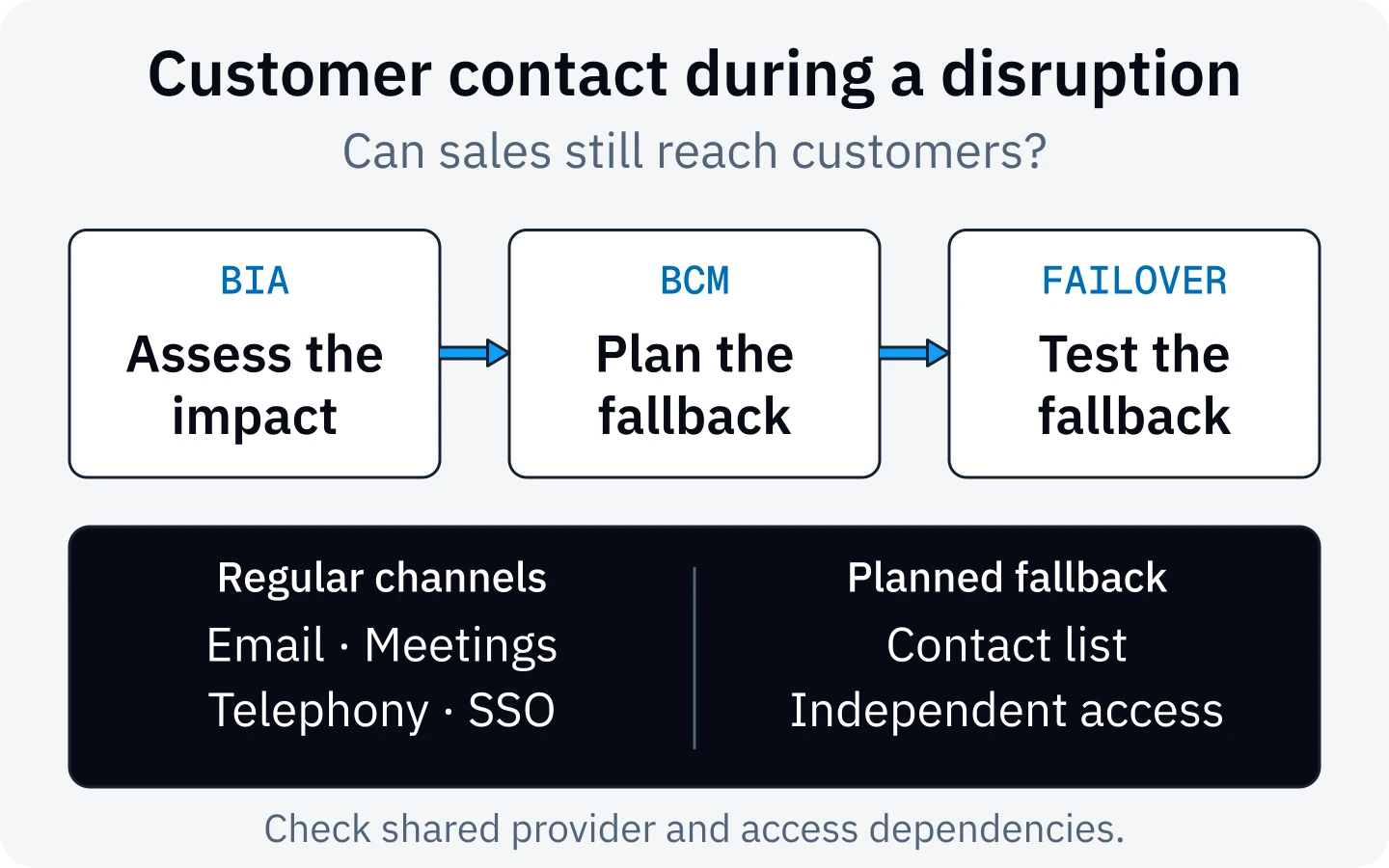
A Business Impact Analysis, or BIA, starts with the business process. For a small sales team, the objective might be to receive urgent customer enquiries and send time-sensitive quotes.
Agree the relevant deadlines and consequences with the person responsible. How long can this work stop? When does the backlog cause significant harm? What minimum level of service must continuity operations achieve? This leads to a recovery objective within the tolerable interruption period.
The outcome does not have to be an immediate replacement for every meeting and mailbox. It may be temporarily sufficient to keep the main sales number reachable, record requests for callbacks and coordinate the most urgent orders. The business owner decides which limits are acceptable based on the impacts.
A business impact analysis in Kopexa supports this assessment. Then connect the process to the services, suppliers and people needed for the agreed minimum level of service.
Plan failover before the phone system stops working
Failover is a prepared switch to an alternative route. It needs to fit the actual cause of the outage. A second internet connection helps when the site's connection fails. A disruption to the cloud service in use may need a different alternative.
Depending on the architecture, telephony alternatives might include call forwarding prepared with the carrier or a connection that can be used separately. Agree with the telephony provider when the switch takes effect and which components must remain reachable. A mobile phone may allow outgoing calls. You still need to establish whether customers can reach the published business number.
For sites with Direct Routing, Microsoft documents a Survivable Branch Appliance. If the site's internet connection fails, it can support making and receiving calls through the public telephone network, provided the local telephony infrastructure remains reachable and was configured appropriately in advance. Test with the provider whether this solution covers your specific outage scenario. Microsoft on the Survivable Branch Appliance
For meetings, a different conferencing route approved in advance can help. Access and the required dial-in details must be available under the assumed outage conditions. Documents need a suitable transfer route that preserves confidentiality and permissions.
Test the alternative process with a real business task
A useful test starts with the customer. Have a designated person call the sales number from outside the organisation. Do they reach the intended alternative connection? Can the team sign in to the alternative tool without the affected sign-in service and open the necessary contact details and working information? Can an urgent task be completed using approved test data?
Record the result, ownership and outstanding corrections in the existing test or incident record. Include the return to normal operations and the handling of enquiries recorded during the interruption. If an alternative fails, give that gap a specific corrective measure.
The protection functions needed during the disruption also matter. Microsoft reports issues with Purview and certain dependent Defender functions. An application becoming reachable again does not establish that a policy check works. Before returning to the normal process, also check the affected protection function. Broadly disabling security rules is not a planned alternative process.
For the timeline, impacts and decisions, you can request our Incident Report template. It is provided through the form on the resource page.
How Kopexa supports BCM
In Kopexa, you can assess business processes and interruption impacts and connect the required assets, services and suppliers to them. This makes it possible to see which work depends on the same components or the same identity provider, and where a planned alternative shares the same weakness.
Connect the outage scenario to the risk, the planned continuity procedure and the necessary measures. Setting up call forwarding or correcting a failed test can be assigned to a responsible person through a Work Item. Check results stay with the relevant measure. Configurable review intervals and notifications support reassessment.
The technical switch is configured and tested in the telephony or IT infrastructure. Kopexa connects the business decision to its implementation and the evidence that the agreed continuity operations work.
Start with one critical process, such as customer contact in sales. Establish how much interruption it can tolerate and check whether the alternative meets that limit.
Sources
- Microsoft Service Health: Users may be unable to connect to multiple Microsoft 365 services — Microsoft () [Accessed ]
- Microsoft: Public source data for the status update — Microsoft [Accessed ]
- Microsoft 365 Status: Investigation of Exchange Online incident EX1550543 — Microsoft () [Accessed ]
- Microsoft Learn: How to check Microsoft 365 service health — Microsoft [Accessed ]
- Microsoft Learn: Learn about data loss prevention — Microsoft [Accessed ]
- Microsoft Learn: Investigate data loss alerts with Microsoft Defender XDR — Microsoft [Accessed ]
- Microsoft Learn: Create a resilient access control management strategy — Microsoft [Accessed ]
- Microsoft Learn: Survivable Branch Appliance for Direct Routing — Microsoft [Accessed ]