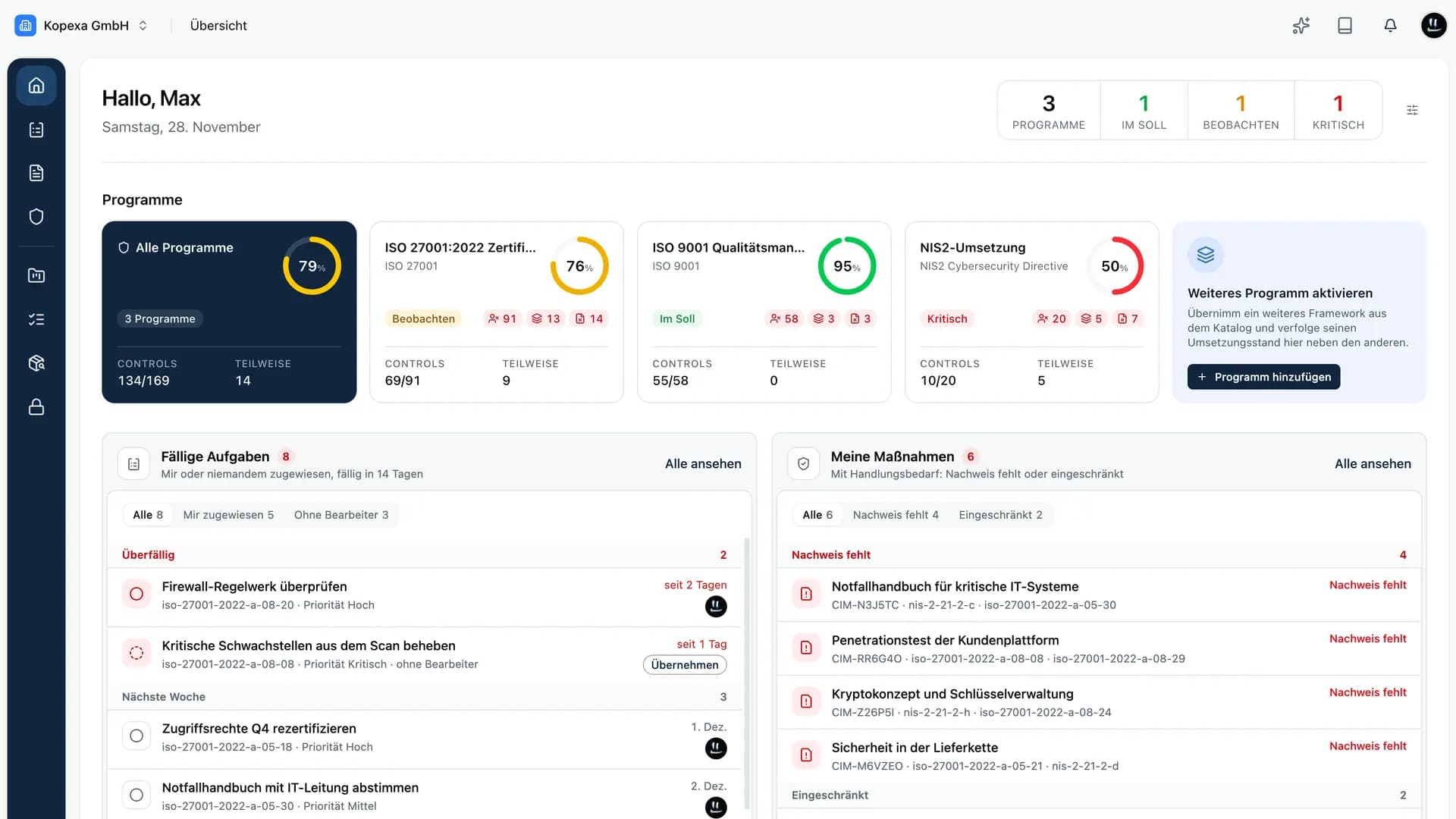
Every space now opens with an overview. It shows how far your programs have come and what is on your desk today: tasks due, measures without evidence, upcoming reviews, open incidents and the risk situation. Also new are configurable reporting deadlines for incidents and proper follow-up of findings. In the Workforce Hub, emails tell your employees about new tasks and upcoming deadlines.
TL;DR
- Space dashboard as the new start page: the implementation status of every program with a traffic light, and below it your work in widgets that space admins can arrange.
- KPI trend: how many KPIs are on track, month by month, on the dashboard and in the KPI list.
- Reporting deadlines for incidents under GDPR, NIS2 and DORA, with questions on the reporting obligation, deadlines per stage and email reminders. The incident list shows the next deadline, has quick filters and can be sorted.
- Findings: a corrective action plan with a deadline, an effectiveness check and a follow-up list for everything still open.
- Workforce Hub: employees get an email about new tasks and upcoming deadlines, you can send targeted reminders, and you see a person's progress right on their page.
The space dashboard
At the top you see the implementation status of each program, computed from its controls and their measures. A traffic light tells you at a glance which programs are on target, which to watch and which are critical. For every program you also see where the gaps are: controls without an owner, without a measure or without evidence.
Below that comes your work:
- Due work items: everything overdue and everything due in the next 14 days, as long as it is assigned to you or to nobody. You can set the window to 7, 14 or 30 days. You take over unassigned tasks with one click.
- My measures: your measures whose evidence is missing or no longer valid.
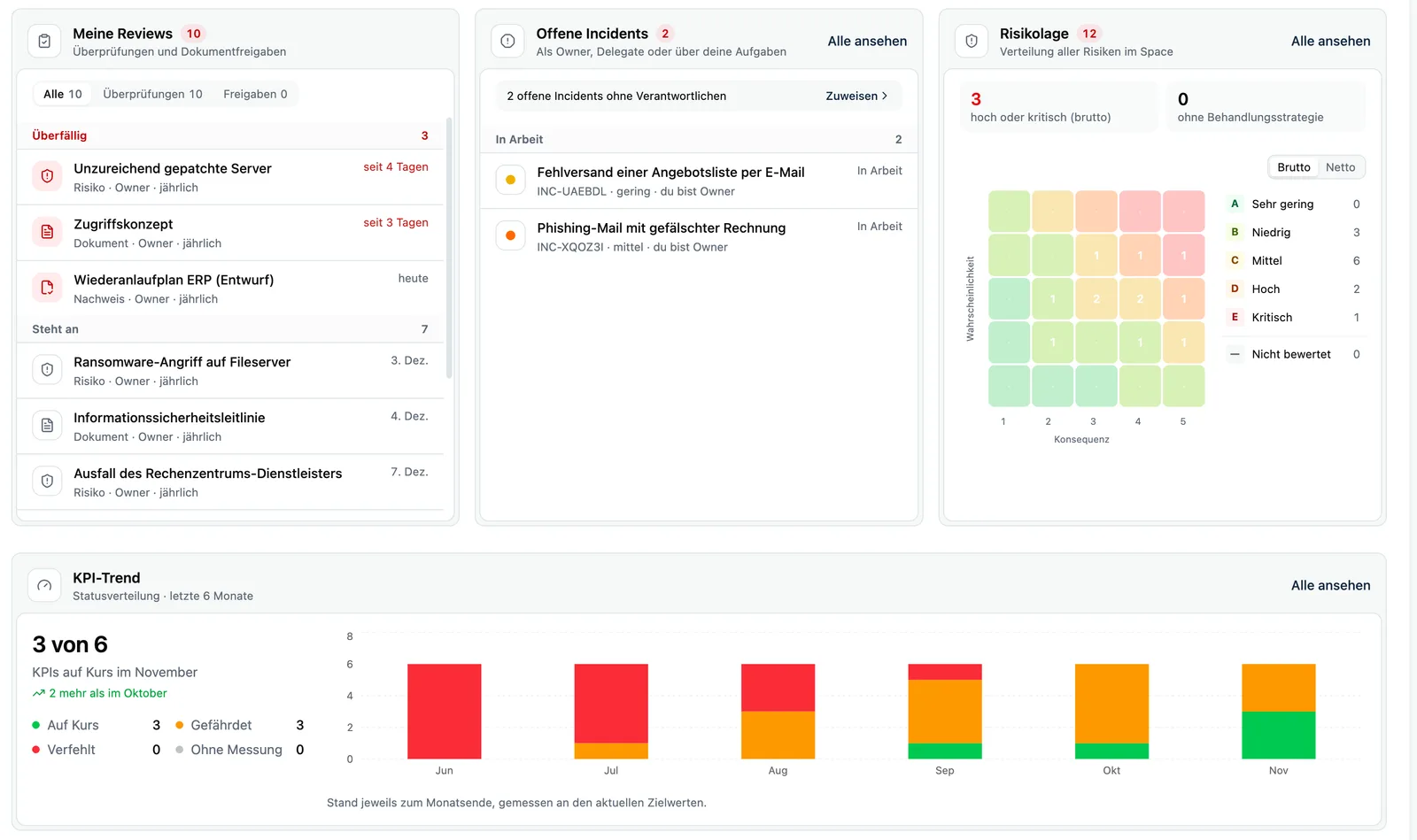
- My reviews: upcoming reviews of documents, risks, vendors, processes, processing activities and evidence, plus document approvals waiting for your vote.
- Open incidents: incidents you are involved in as owner, as delegate or through a task, and how many open incidents still have no owner.
- Risk situation: the heatmap of all risks, inherent or residual, and how many are high or critical.
With "Customize dashboard", space admins arrange the widgets for everyone in the space, change their width and add or remove widgets.
KPI trend
The new "KPI trend" widget, which you add with "Customize dashboard", shows how many of your KPIs are on track, at risk or missed over the last 3, 6 or 12 months. Instead of the status mix you can show the average goal attainment, and limit the view to strategic or operational KPIs. The KPI list has the same evaluation as a card above the table, following your filters, and a new "Measurement cycle" column with the current period.
Incidents: reporting deadlines, filters and sorting
Under incidents you find the new "Reporting deadlines" section. It holds rule sets for GDPR and NIS2, both active, and for DORA, which you switch on when you need it. Each rule set is a flow: Kopexa checks details of the incident automatically, such as its severity, and asks the questions that decide whether you have to report. That results in a deadline per stage: under GDPR the notification to the supervisory authority after 72 hours, under NIS2 an early warning after 24 hours, a notification after 72 hours and a final report one month after the notification. Space admins adjust the rule sets and add their own, for example for your cyber insurance.
On the incident, the "Reporting deadlines" tab is where you answer the questions, record events as they happen and tick off each stage. The owner and the delegate get an email reminder before each deadline, and one email if a deadline is missed.
The incident list gets the new "Next deadline" column, and the new quick filters "Overdue", "Due in 24 h", "Open questions", "Assigned to me" and "All open" take you straight to what matters now. You can now also sort the list by title, status and incident date, with the newest incidents on top by default. Shift-click sorts by several columns.
Following findings through to effectiveness
A finding now has a "Correction & effectiveness" tab: root cause analysis, the requirements that were violated, and a corrective action plan with a goal and a deadline. Once the correction is in place, "Check effectiveness" walks you through method and result, for example a sample or a re-audit. For non-conformities and for critical or high findings, this check is required before a finding counts as resolved.
The "Follow-up" quick filter in the findings list shows what is overdue, due soon or has no deadline yet. The weekly digest reminds you of corrections that are due. The audit report shows the correction goal, the deadline and the effectiveness check, and the finding tracker has its own follow-up section. You can now also change the type of a finding after creating it.
Workforce Hub: employees know what to do
Every morning at 7 a.m., your employees with access to the Workforce Hub get an email when something has changed for them: new tasks, a new policy version they need to confirm again, and deadlines that are coming up. Each task is reported only once, each deadline gets one reminder, and on days without news no email goes out. The email is on by default, and the reminder is preset to three days before the deadline. You set both in the Workforce Hub settings under "Notifications".
When you need to follow up, "Remind" reminds one person or everyone who still has open tasks in a task set, with a personal note if you like. Each person is reminded at most once in 24 hours. On a person's page you now see their progress in every task set, down to the single task, and all of their tasks at once.
Further improvements
Workforce Hub
- For people with portal access you can change the email address. Their tasks and progress move to the new address.
- Kopexa documents can be linked into the knowledge base.
- Tasks that already have progress are removed from the set instead of being deleted, so completed confirmations are kept.
- The progress page of a task set is clearer and pages reliably.
- Search also finds parts of words, and tables show up as tables in the knowledge base preview.
Documents and reports
- Document versions can get their own name, for example 2.1 or Rev. B.
- The SoA export and the audit report come in the language of the space.
Risks
- A risk with the "Avoid" strategy is no longer archived automatically.
Tables and AI connection
- Sorting by fields that are not always filled in now also works reliably when paging.
- Through the AI connection you can now also manage Workforce Hub content, link objects, assess risks and record protection needs. Saving and linking are more reliable as well.